


For cash buyers
Cash Trader
Price inventories, log purchases, and track your cash trades, all in one place.
Paste a Steam profile link and every tradable skin is priced at once on CSFloat, Buff163, YouPin and more, with float and sticker overpay hints.
Pick the skins, set your offer as a percentage and send one link. The seller accepts by signing in with Steam.
Received skins move to Holding with their buy price. Mark them sold and the Sold tab keeps your profit per trade.
How Cash Trader works
Cash Trader is the workspace for people who buy CS2 skins for cash: trade-in services, Discord traders and anyone who prices other people's inventories. It replaces the spreadsheet, the ten open marketplace tabs and the chat message with a price in it.
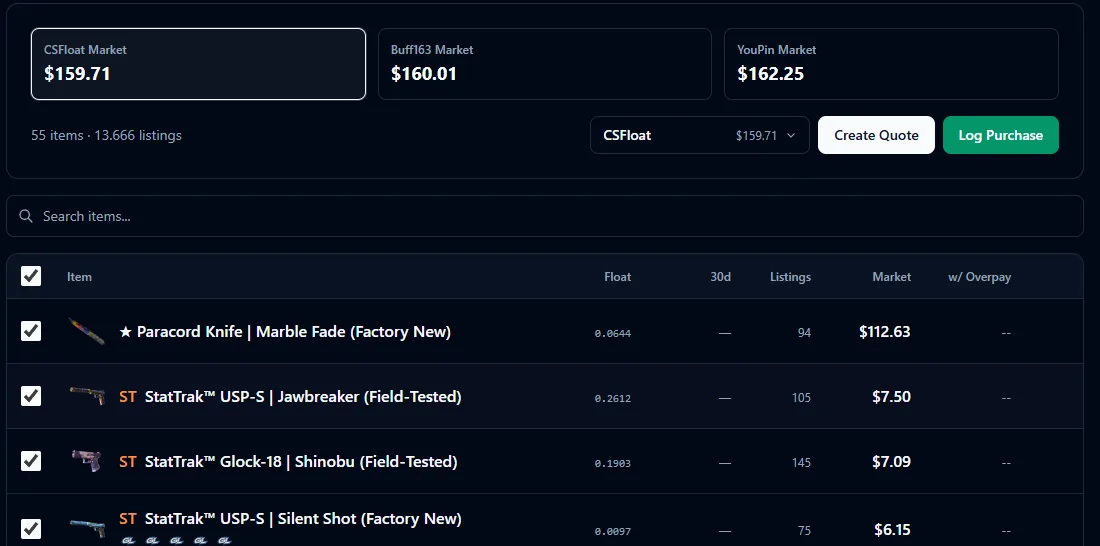
Price a whole inventory in seconds
Paste a Steam profile link or Steam ID and every tradable item is priced at once, against the live prices CS2Locker tracks across the major marketplaces.
- Totals per marketplace side by side, so you see what the inventory is worth on CSFloat, Buff163 or YouPin before you make an offer.
- Float, listing count and market price per skin, sortable.
- Float and sticker overpay hints, so a rare float or a strong sticker craft never slips through at base price.
- Pick the price source you trade on; Cash Trader remembers it for the next inventory.
Send a quote the seller can accept
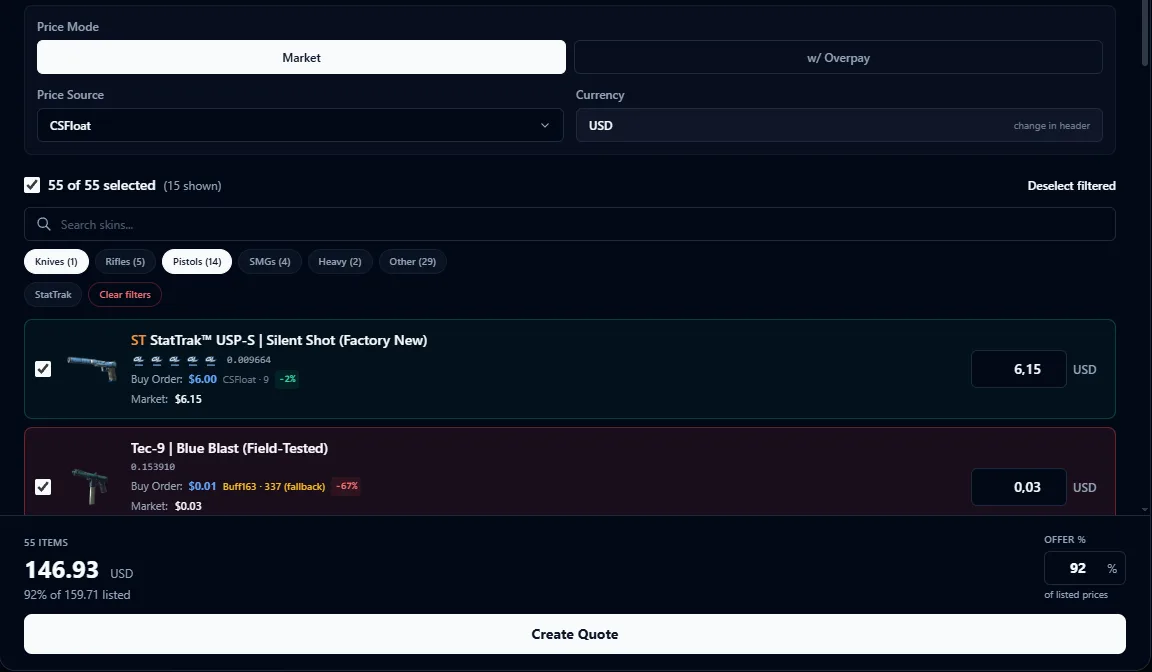
Tick the skins you want, set your offer as a percentage of the listed prices and send one link. The seller opens it, sees every item with its price and accepts by signing in with Steam.
- Liquidity at a glance: green rows have buy orders close to the listing price and resell easily, red rows sit far below and need a closer look.
- Switch the price source and every item re-prices; the offer percentage applies to the total.
- Add notes and terms the seller has to agree to before accepting.
- Embed a public inventory estimator on your own website with one snippet.
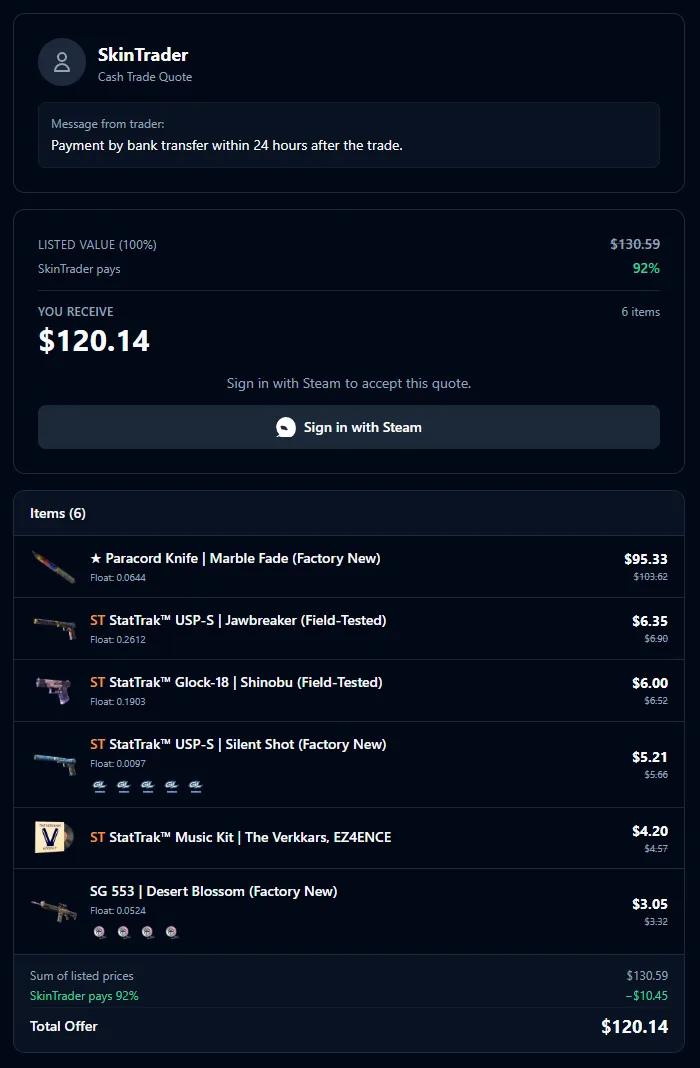
A clear offer, not a number in a chat
Your quote link opens a clean page under your trading name. The seller sees what their skins list for, the percentage you pay and exactly what they receive, item by item.
- Listed value, your offer percentage and the payout, all on one card.
- Every skin with its float, stickers, your price and its listed price.
- Your note, for example how and when you pay.
- One button to accept: the seller signs in with Steam, no account needed.
Track what you hold and what you made
Accepted quotes move through a simple flow, so you always know which skins are still on the way, which are paid and what each one earned you.
The link is out. Edit or cancel it until the seller accepts.
Mark the skins as received once they are in your inventory. They move to Holding.
Every skin you own with its buy price, current market price and open profit.
Mark a skin as sold with its sell price. The Sold tab keeps your profit and loss per trade.
Why cash buyers use it
No copying names into marketplace tabs. One paste prices everything, with the source you trade on.
Overpay hints come from historical float tiers and comparable sticker craft sales, the same data behind CS2Locker's free tools.
Sellers get a clean page with every skin and price instead of a number in a chat, which makes saying yes easier.
Holding and Sold turn every deal into a record, and the partner statistics show which sellers bring you profitable stock.
Questions
Who is Cash Trader for?
For anyone who buys CS2 skins for cash: trade-in and cash-out services, traders on Discord and Telegram, and resellers who price other people's inventories every day.
Which marketplaces does it price against?
The marketplaces CS2Locker tracks for its live prices, including CSFloat, Buff163 and YouPin. You choose which source a quote uses.
Does the seller need an account?
No. The seller opens the quote link and accepts by signing in with Steam. You can also mark a quote accepted yourself when you agreed in chat.
Can I try it first?
Yes. Every plan starts with a 10-day free trial and you can cancel anytime from Manage Subscription.
Does it need my Steam password or API key?
No. Pricing reads public Steam inventories. You only sign in with Steam to use your own account.
10-day free trial, cancel anytime.